What usability testing is
Usability testing means watching real users as they interact with a system. That could be a computer system, a website, a phone or any other device. We do this because when we design a system, we can't predict how real users will actually experience it. We need to see them using it to find out if what we built is easy to use and makes sense.
The same goes for websites. Neither the people building a site nor its owners can spot every part that might confuse or frustrate users. Usability testing lets us see the site through the users' eyes.
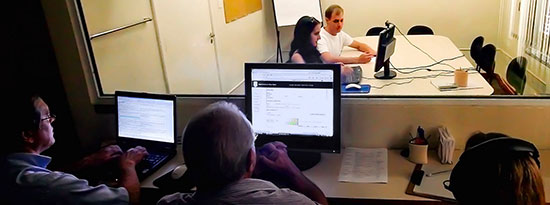
In a classic usability test, testers sit in a room while a facilitator asks them to perform specific tasks. Behind a one-way mirror, everyone involved in the project watches and records the process.
Usability testing works. According to research from the Norman Nielsen Group, websites that run usability tests double their sales on average. In another study from the same group, businesses that put 10% of their website budget into usability testing saw an 83% boost in performance.
Remote Usability Testing
The problem with classic usability testing is the high cost, the challenge of finding the right users, and the time it takes to organize. Remote usability testing with Userfeel.com solves this.
Userfeel.com is the remote usability testing platform we first built in 2010 and redesigned with lots of new features in 2017.
Remote usability testing with Userfeel.com is simple and fast:
1. Pick from a large pool of users worldwide, speaking 40 different languages. Choose how many tests you want to run for each device type (desktop, tablet, mobile), and set the demographics (country, language, age, experience).
2. Set the scenario and tasks users need to complete, along with up to 4 written questions they'll answer after the test. For example: "You want to buy a gift for a friend. Find a black dress under 60 euros and buy it."
3. Userfeel.com invites users who match your criteria and they start the scenario.
4. Every screen movement gets recorded, and their voice is captured as they talk through their thoughts and reactions.
5. After finishing the scenario, users answer your written questions.
6. Within a few hours, you get the videos and the users' answers.
Watch the Userfeel.com intro video for a walkthrough of the process:
When you review the usability test results, you spot the problems users run into. It's easy to figure out what needs to be fixed. Make your site easier to use and with fewer issues, and sales and overall performance go up.
Two real-world examples
See how, in a test on ofarmakopoiosmou.gr, the user says they wish they could compare two products:
Notice how, on bsbfashion.com, the user struggles because there are no filters for size and price in the search results. That can tire users out and push them to leave without buying.
Improve your website and boost your conversion rates by running usability tests with Userfeel.com.